Exercise
- Clone down the repository https://github.com/code61/sinatra_c3s2
- In the command line, run
bundle install - Then run
ruby app.rb - And navigate to http://localhost:4567 to see the app running
- Also open
app.rbin VSCode.
Today we’re going to be looking at HTML forms, and submitting data to a server. We’re going to use a Sinatra app as an example:
Exercise
bundle installruby app.rbapp.rb in VSCode.If you look at the html in Chrome devtools, you’ll see the following html:
<form method="post" action="/">
  <input type="text" name="user_name" />
  <input type="text" name="user_age" />

  <input type="submit" />
</form>
This is a simple form. If you fill in some values and click submit, in the devtools network tab, you should see the following request being sent to the server (note that I’ve collapsed some sections!):
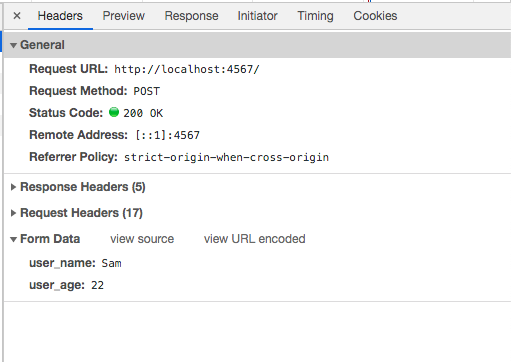
You’ll notice that at the bottom of the request, there’s a section called “Form Data”, which
consists of a data key (e.g. user_name) and a value (e.g. Sam).
When you click the “Submit” button, the browser creates the form data by looking at the values
typed into the form. It uses the name attribute for the data key, and the contents of the
input box for the value.
The browser then attaches this data to the request.
You might notice the “Request Method: POST” at the top of the request. In the previous course you have probably only seen requests with “Request Method: GET”, which is the type of request that a browser will send when you type a URL into the address bar, or click on a link.
GET and POST are both html verbs. A verb gives a clue to the server about the intent of the request. This can help the server do it’s job. For example, as GET requests typically just read data, servers can often save some work by returning a cached copy of the page, whereas it couldn’t do this with requests that change data on the server.
There are 30+ http verbs defined in the specification, but you’ll probably never come across most of them. The most commonly used ones are:
| Verb | Used to | Example | |
|---|---|---|---|
| GET | Read | GET /users/1 | Gets the page for user with id=1 |
| POST | Create | POST /users | Creates a new user |
| PATCH | Update/Modify | PATCH /posts/2 | Updates post with id=2 |
| DELETE | Delete | DELETE /users/1 | Deletes the user with id=1 |
These interactions are a common pattern in web applications, and are commonly referred to as CRUD operations: Create, Read, Update, Delete.
Last time we looked at responding to GET requests in Sinatra:
get '/' do
  "Hello there!"
end
Responding to a POST request is similar:
post '/' do
  name = params[:user_name]
  age = params[:user_age]

  "Hello #{name}. You are #{age} years old."
end
Note that, like the words matched in the url, the value of the user_name field is made available
in the params hash. (If you want to have a look at the params hash you could put a raise params.inspect
at the beginning of the method.)
Exercise
raise params.inspect right at the top of the post block.